What the test resolves
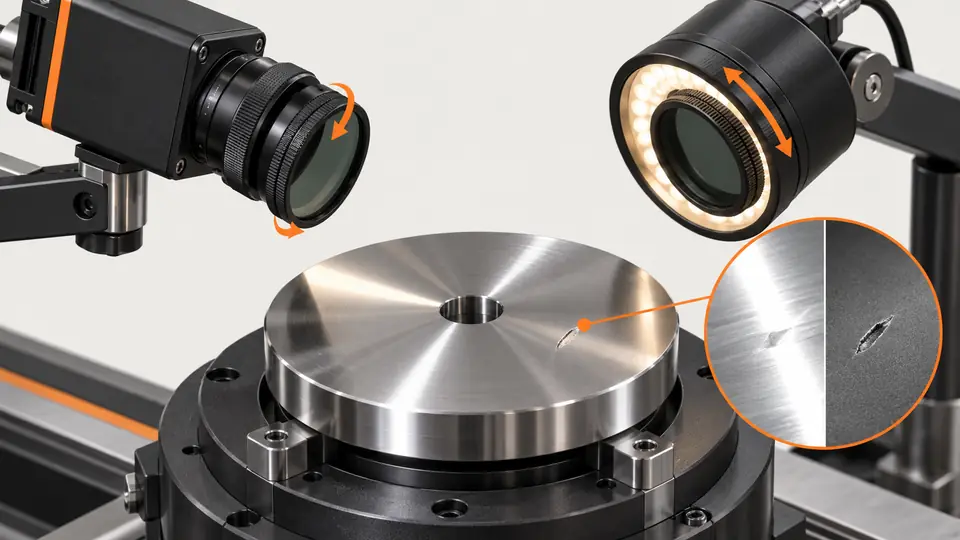
Suppressing a bright reflection is useful only if the defect remains visible. Compare unpolarized and cross-polarized images on the same scratched and good surfaces.
This is a vendor-neutral commissioning method. Check the exact camera, lens, sensor or controller manual before changing settings. The numerical worksheet is hypothetical, not a Deyi Vision measurement or a product specification.
Start by naming the visual failure: a clipped reflection covering a scratch, a reflected lamp contour triggering the detector, or unstable contrast as the part tilts. Keep these cases separate in the results sheet. A cleaner looking background is not proof of better inspection. The question is whether the selected optical arrangement preserves the information needed to distinguish the smallest relevant defect from an acceptable surface.
Operating prerequisites
Use representative materials and angles; metallic, rough and curved surfaces can respond differently. Polarizers reduce useful light too, so record exposure changes explicitly.
Select good and defective parts with comparable finish, coating and curvature, and label the defect location before acquisition. Include surfaces near the difficult end of the production range. Do not compare a glossy defective part with a matte good part and attribute their difference to polarization. The following pairing and recording controls are a vendor-neutral experimental design, not a prescribed setting for a particular filter or camera.
Bench and records
Prepare a source polarizer, rotatable lens analyzer, rigid mounts and labeled samples. Lock gain and geometry; mark analyzer angle and inspect filter/illumination ratings.
Photograph the mechanical arrangement and mark mounts so a removed filter can return to the same position. Record lamp direction, camera pose, focus, aperture and background. Disable automatic exposure and gain changes during the comparison. Check that neither the source polarizer nor the analyzer obstructs the required field, and that the mounting arrangement remains suitable for the illumination's operating conditions.
Run the test
- Capture configuration A without polarization on good and defective samples.
- Add source polarizer and rotate the analyzer to find the lowest glare, recording angles.
- Capture B first at the same exposure, then at a separately recorded brightness-matched exposure within motion limits.
- Compare saturated ROI fraction, defect CNR and actual detector results across part tilt and material batches.
Run the unpolarized capture again after the polarized capture. If the repeated baseline changes, investigate movement, lamp drift or sample handling before interpreting the filter effect. Inspect the same defect coordinates in each raw image. Keep the unchanged-exposure comparison separate from the brightness-matched comparison: the former isolates the optical change, while the latter tests whether a usable production image can be recovered within the exposure constraint.
Hypothetical worksheet
Hypothetical 10000-pixel ROIs contain 1200 clipped pixels in A and 80 in B: 12% versus 0.8%. A B-image CNR of 3.2 is promising only if independent defect tests pass; glare suppression alone is not acceptance.
clipped_fraction = clipped_pixels / ROI_pixels
A: 1200 / 10000 = 12%
B: 80 / 10000 = 0.8%
CNR_A = 1.5; CNR_B = 3.2 (hypothetical)| Quantity | Hypothetical value | Meaning |
|---|---|---|
| Baseline clipping | 12% | 1200 clipped of 10000 pixels |
| Polarized clipping | 0.8% | 80 clipped of 10000 pixels |
| Polarized CNR | 3.2 | Hypothetical contrast-to-noise comparison |
Use the clipping mask to find where lost information occurs, not only how much of the image is clipped. A lower saturated fraction can still leave the critical scratch covered. Calculate defect and background statistics using consistently placed regions and record the noise definition used for CNR. Do not copy a CNR acceptance threshold from this illustrative worksheet into a production inspection without validating it on your defects.
Test sequence
Test sequence
Place polarization at the source and analyzer at the lens; examine the reflected path from the same surface.
- Source
- Polarizer
- Surface
- Analyzer
The sequence diagram represents a controlled comparison. Associate each image with sample identity, configuration, analyzer orientation and the actual acquisition settings. Changing geometry and polarization together makes the cause of an improvement unclear. If geometry must change, treat that arrangement as a separate experiment and retain its own baseline rather than merging the evidence into the original A/B pair.
Interpret the evidence
Interpret the evidence
Compare glare fraction and defect evidence separately for A and B; darker does not mean better inspection.
- Baseline A
- Polarized B
- Glare
- Defect
The comparison diagram should be read alongside the defect crops. Follow both the reflection and the defect as the analyzer rotates; they may fade together. Compare an acceptable surface in the same way to identify texture that could become a false alarm. Keep examples of unsuccessful angles, because they explain why the chosen orientation was selected and help diagnose a later mounting shift.
Troubleshooting
- If both glare and scratches vanish, change illumination angle before selecting the darkest analyzer setting.
- If exposure compensation causes moving-image blur, use more suitable light or geometry rather than exceeding the validated exposure ceiling.
When glare suppression varies across a curved part, map the failing region against pose instead of assuming a single angle will work everywhere. When a dark image requires excessive gain, inspect the raw noise and available illumination before adjusting the detector. If a coating or material lot responds differently, rerun the paired optical test; software tuning cannot establish that a previously hidden defect is now visible.
Acceptance and handoff
Accept the configuration only when representative defects remain detectable and good parts pass over the required tilt range. Save A/B raw images, analyzer orientation and both exposure comparisons.
Archive the raw files, settings, sample identifiers and decision limits together. Discuss the documented requirements with Deyi Vision using the related product and preparation guides below.
Finish with independently labeled parts that were not used to choose the analyzer orientation. Confirm defect detection and good-part rejection behavior across the declared poses at the intended line conditions. Document the exposure ceiling, mounting marks and conditions that require a new comparison. A successful handoff contains raw failures as well as successes, so another engineer can reproduce the decision rather than infer it from a presentation image.
Sources and technical references
These references explain the methods and limits used in this tutorial. Example checks are guidance; production acceptance requires evidence from your own samples.
- Successful Light Polarization TechniquesEdmund Optics
Source polarizer and lens analyzer can suppress reflections; actual material response must be tested.
Checked - Machine Vision Filter TechnologyEdmund Optics
Polarization and spectral filters alter which light reaches the camera.
Checked
Component and selection references
- Machine Vision Lighting
- Reflective Metal Scratch Inspection Lighting Route
- How to Choose Machine Vision Lighting
- Machine Vision Lighting Types
- Machine Vision Lighting Basics
- Backlight vs Coaxial Lighting
- Automotive Metal Surface Defect Inspection
- Metal and Surface Inspection
- OPT Lighting Alternative
- Lighting and ROI for a visible liquid boundary
- Calibrate flat-field shading without hiding bad data
- Compare red, blue and white illumination by defect contrast
- OCR labels: light and field geometry
- Choose lighting and ROI for open-package contents
- Seal and bead appearance: lighting and ROI
- SKU color sorting: light and object mask
- Verify the optical strobe inside the exposure window
- Surface defects: acceptance and line output
- Surface defects: bounded AI evaluation
- Surface defects: camera sampling and motion
- Surface defects: light and ROI validation
- Surface defects: false-alarm diagnosis