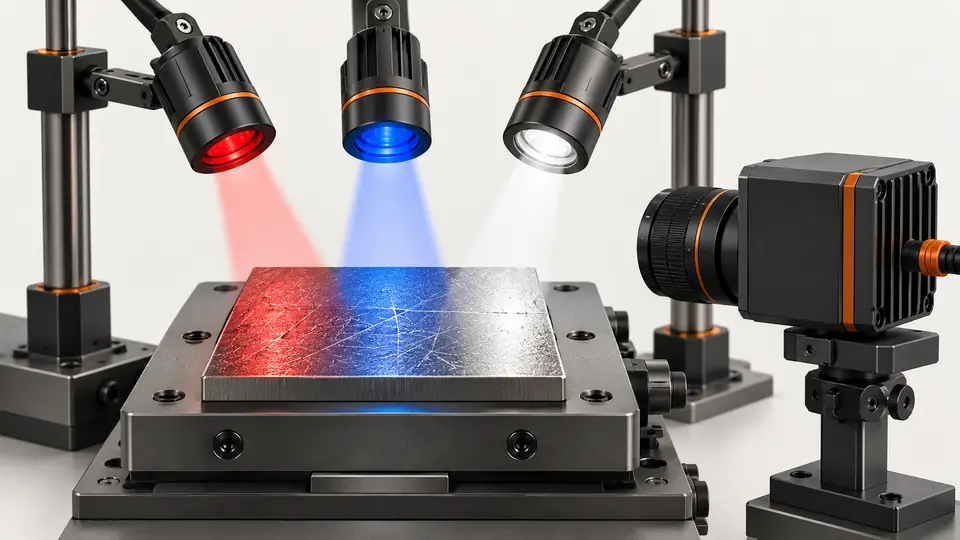
What the test resolves
Choose light color from measurable defect/background separation, not the brightest image. Color changes can invert contrast and move best focus.
This is a vendor-neutral commissioning method. Check the exact camera, lens, sensor or controller manual before changing settings. The numerical worksheet is hypothetical, not a Deyi Vision measurement or a product specification.
Define the feature that needs separation before selecting a color: contamination, a printed mark, a scratch or a missing coating. Label good and defective samples independently of their image brightness. The aim is a repeatable decision on that feature. A color that makes the whole part attractive can still reduce the information available to the detector.
Operating prerequisites
Use a monochrome camera and unchanged lighting geometry for the first comparison. Keep exposure within motion limits; record wavelength/band and any spectral filter.
Keep source position, diffuser, background and viewing angle fixed during the first comparison. If the available lamps have different emitting areas or beam patterns, record that limitation; the result compares complete lighting arrangements rather than wavelength alone. Use actual production material lots, including acceptable color variation. Do not select the lamp from a single conveniently colored sample.
Bench and records
Prepare red, blue and white sources, labeled material lots and fixed defect/background ROIs. Set gain manually and retain unclipped raw images.
Record the source identifier, spectral filter, lens setting and camera processing alongside every capture. Disable automatic brightness adjustment, gamma changes and dynamic display scaling for the experiment. Use raw pixel values for analysis rather than screenshots. Confirm that the background region represents the surface adjacent to the defect, not an unrelated bright area elsewhere on the part.
Run the test
- Warm the sources and acquire each color at the same exposure.
- Adjust light output to similar unsaturated background levels and label this second comparison separately.
- Calculate signed contrast and noise for each sample; preserve dark/light polarity.
- Check focus after wavelength changes and validate detector results on independent lots.
Repeat the initial light color after cycling through the alternatives to reveal sample movement or lamp drift. Keep the fixed-exposure series and the brightness-matched series as distinct records. Change lamp output for matching only within its supported operating range. Do not compensate poor optical separation with increased gain and then describe the result as a wavelength-only improvement.
Hypothetical worksheet
Hypothetical ROI means give contrast −0.167 for red, −0.600 for blue and −0.326 for white. Blue separates this example best, but noise, focus and material variation still determine whether it is usable.
signed_contrast = (mean_defect - mean_background) / mean_background
Red: (150 - 180) / 180 = -0.167
Blue: (70 - 175) / 175 = -0.600
White: (120 - 178) / 178 = -0.326| Quantity | Hypothetical value | Meaning |
|---|---|---|
| Red contrast | −0.167 | Defect darker than background |
| Blue contrast | −0.600 | Strongest separation in this example |
| White contrast | −0.326 | Broadband comparison |
The signed worksheet preserves whether the defect is darker or brighter than its surroundings. Inspect the underlying distributions as well as their means: textured good regions and defects may overlap even when average contrast looks strong. Record clipping and temporal variation separately. The example ranks these particular hypothetical regions; it does not establish a universal preference for blue illumination.
Test sequence
Test sequence
Compare three colors on one material with unchanged geometry and explicitly controlled brightness.
- Red
- Blue
- White
- Same target
Use the process diagram as a traceability checklist. Every color branch should refer to the same labeled sample and comparable regions, with the acquisition settings attached. Reject comparisons that changed the sample surface or measurement region unnoticed. When a spectral filter is added, give that source/filter combination its own configuration identity so another engineer can reproduce the comparison.
Interpret the evidence
Interpret the evidence
Measure polarity and noise before focus and detector validation.
- ROI means
- Signed contrast
- Focus
- Detection
Separate the fixed-focus comparison from an explicitly recorded refocused comparison. The former measures the impact of exchanging illumination in the current setup; the latter evaluates a redesigned operating configuration. Check the smallest required detail across the field after any focus change. An improved central crop does not establish that the corner features or measurement scale remain acceptable.
Troubleshooting
- If contrast reverses, update detector polarity only after validating good and defective samples.
- If one corner loses contrast with another color, inspect focus and lens wavelength performance rather than blaming the algorithm.
If contrast changes sign between lots, inspect material and surface variation before fixing detector polarity. If apparent color benefits disappear at production exposure, check noise and the available light output. If a filter improves one feature but hides another, preserve both failures and revisit the inspection requirement. Choosing a favorable crop cannot resolve incompatible feature requirements.
Acceptance and handoff
Select a wavelength only after worst-lot separation and false-alarm limits pass at production exposure. Archive raw ROIs, source/filter identity and focus position; do not generalize the example to all colored materials.
Archive the raw files, settings, sample identifiers and decision limits together. Discuss the documented requirements with Deyi Vision using the related product and preparation guides below.
Choose the candidate using declared defect-detection and false-alarm criteria, then test independent lots at the intended speed and pose range. Document which material changes require reevaluation. Save rejected color candidates and their raw regions, not only the winner. The handoff should explain whether improved separation came from color, focus or a different lighting geometry, and which changes remain untested.
Sources and technical references
These references explain the methods and limits used in this tutorial. Example checks are guidance; production acceptance requires evidence from your own samples.
- Wavelength Effects on PerformanceEdmund Optics
Wavelength changes can alter focus and optical performance; real lenses need evaluation.
Checked - Machine Vision Lighting Selection GuideKEYENCE
Illumination geometry and object/light color influence feature contrast.
Checked
Component and selection references
- Machine Vision Lighting Basics
- How to Choose Machine Vision Lighting
- Machine Vision Lighting
- Machine Vision Lighting Types
- Reflective Metal Scratch Inspection Lighting Route
- Backlight vs Coaxial Lighting
- Automotive Metal Surface Defect Inspection
- Metal and Surface Inspection
- OPT Lighting Alternative
- Lighting and ROI for a visible liquid boundary
- Calibrate flat-field shading without hiding bad data
- OCR labels: light and field geometry
- Choose lighting and ROI for open-package contents
- Run a polarization A/B test for glare
- Seal and bead appearance: lighting and ROI
- SKU color sorting: light and object mask
- Verify the optical strobe inside the exposure window
- Surface defects: acceptance and line output
- Surface defects: bounded AI evaluation
- Surface defects: camera sampling and motion
- Surface defects: light and ROI validation
- Surface defects: false-alarm diagnosis