Purpose and operating boundary
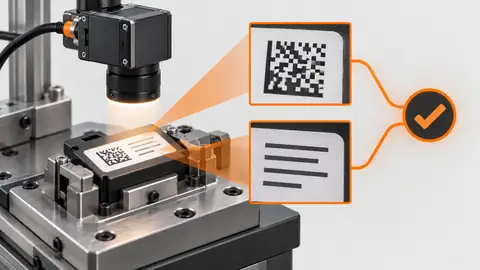
Preserve the whole text field through lighting comparison and ROI mapping so that a cropped or reflected character cannot silently disappear from verification.
This tutorial defines an engineering evaluation, not a ready-to-run product certification. The current Deyi Vision public PC example covers an EAN-13 workflow on confirmed sample images. Native OCR and detection work in the engineering code must be checked against the installed runtime, bound models and job before use. A browser template does not prove browser execution: the planned OpenCV.js backend needs separate verification. Cloud recognition requires explicit approval of the image scope, provider, model and cost. A review archive is not an executable release package. Camera, firmware and driver compatibility require their own check. All worksheet values below are hypothetical; they are not Deyi Vision measurements or customer results.
Prepare the evidence
Use a printed label with glare, curved stock and known field positions. Keep the expected strings outside the recognizer input. Repeat the selected condition after restoring the fixture, not merely while leaving everything untouched. This reveals whether the recipe can be reproduced during changeover. Record ambient-light state and the time since illumination was enabled when these affect the image. Do not compare measurements taken from different masks or different bit-depth conversions as though only lighting changed. Keep the rejected optical condition in the record, including its image and the reason for rejection. A visually attractive image is not automatically the best inspection image: the selected condition must preserve the relevant feature and its separation from acceptable variation over the full agreed sample range. OCR label verification is a data-integrity task rather than a search for plausible words. Define each field, its location, expected alphabet, exact comparison policy and the trusted source of the expected value. A lot field, date field and product name may need different rules. Keep the text detection polygon and recognizer output before normalizing spaces or case. Do not silently replace I with 1 or O with 0: that can make a wrong label appear correct. The original engineering evidence includes a narrow OCR boundary case that returns NoResult or Review; increasing a crop does not establish general recognition readiness. A readable field can still contain the wrong lot, while a correct expected value does not justify filling an unreadable field with that value. Build a controlled optical comparison before moving the threshold. Mark the fixture, working distance, light angle and focus so that each condition can be restored. Change only the selected lighting or region variable while holding the camera settings and sample identity fixed. Retain the entire source frame beside every crop or mask, with the transform back to source coordinates. Capture both acceptable variation and a known problematic sample, including the edge of the allowed placement range. Inspect the region overlay on the original image before interpreting a numeric result. A smaller region can hide a failure rather than improve inspection, so excluded areas need an explicit engineering reason.
Procedure
- Compare diffuse and directional illumination without changing exposure, and retain faint characters as well as glare.
- Locate the label or stable mark, transform each field to source coordinates and inspect every field corner.
- Keep character ascenders, descenders and whitespace margins; save original and rectified crops with the same source identity.
- Verify that the field stays in bounds at permitted displacement before testing recognition; reject partial crops rather than stretching them.
Interpret the trial
In the hypothetical 640 × 480 frame, the field begins at (100,80) and spans 160 × 64 pixels. Its far corner is (260,144). Passing these bounds establishes geometry only, not readable text or OCR support.
Recording worksheet
| Record | Value / observation | Interpretation |
|---|---|---|
| Source image | 640 × 480 px | Bounds basis |
| Field origin / size | x = 100; y = 80; w = 160; h = 64 | Right = 260; bottom = 144 |
x_end = 100 + 160 = 260
y_end = 80 + 64 = 144
0 <= 100 < 260 <= 640
0 <= 80 < 144 <= 480
Two engineering views
Two engineering views · 1
The diagram shows the order of checks. Each arrow requires recorded evidence; it does not imply an implemented automatic connection. Source frame → Light condition → ROI → Contrast.
- Source frame
- Light condition
- ROI
- Contrast
Two engineering views · 2
The diagram shows the order of checks. Each arrow requires recorded evidence; it does not imply an implemented automatic connection. Baseline → Candidate → Same sample → Decision.
- Baseline
- Candidate
- Same sample
- Decision
Failure diagnosis
- A correct polygon on a rotated preview can be wrong on the unrotated source. Check coordinate mapping.
- Clipped dark strokes under thresholding need optical or preprocessing review, not a guessed replacement string.
Acceptance and handover
Approve the field recipe only after all declared characters remain inside the source-linked region across position and material variation. Save the lighting settings and transform.
Keep the source images, the expected decision, the exact revision and the complete result record together. Freeze the evaluation set before selecting the final parameters. If those answers are later used to tune the workflow, mark that set as development data and obtain a new independent acceptance set. Keep Review, NoResult, execution error and missing acquisition visible in the denominator; do not turn them into passes by filtering rows. Save a reproducible failure alongside the successful sample. The handover should identify who may change the recipe, how a prior approved revision is restored and which device output remains inhibited until acceptance. A software result alone does not establish that a moving physical part reached the correct destination.
Sources and technical references
These references explain the methods and limits used in this tutorial. Example checks are guidance; production acceptance requires evidence from your own samples.
- Deyi Vision machine vision software: evaluation scopeDeyi Vision
Public EAN-13 PC evaluation scope and separate hardware/production acceptance.
Checked - Packaging Label and Barcode Inspection SystemDeyi Vision
Label position, text and barcode inspection require independently observable fields and acceptance on real packaging.
Checked - Geometric Image TransformationsOpenCV
Source/destination coordinate mappings, affine/perspective transformations and interpolation; image geometry does not certify an installed Deyi executor.
Checked - OCR Pipeline Usage TutorialPaddleOCR
Text detection and recognition are separate stages with model/language configuration; upstream use is not a Deyi deployment claim.
Checked
Component and selection references
- Machine Vision Lighting
- Food and Beverage Cap Label Date Code Inspection
- Packaging Label and Barcode Inspection System
- How to Choose Machine Vision Lighting
- Machine Vision Lighting Types
- Machine Vision Lighting Basics
- Reflective Metal Scratch Inspection Lighting Route
- Backlight vs Coaxial Lighting
- Automotive Metal Surface Defect Inspection
- Metal and Surface Inspection
- OPT Lighting Alternative
- EAN-13 traceability: lighting and quiet zones
- Lighting and ROI for a visible liquid boundary
- Calibrate flat-field shading without hiding bad data
- Compare red, blue and white illumination by defect contrast
- Choose lighting and ROI for open-package contents
- Run a polarization A/B test for glare
- Seal and bead appearance: lighting and ROI
- SKU color sorting: light and object mask
- Verify the optical strobe inside the exposure window
- Surface defects: acceptance and line output
- Surface defects: bounded AI evaluation
- Surface defects: camera sampling and motion
- Surface defects: light and ROI validation
- Surface defects: false-alarm diagnosis