What the test resolves
Electrical lamp trigger timing does not prove when light reaches the part. Measure the optical pulse and the supported camera exposure/flash window together.
This is a vendor-neutral commissioning method. Check the exact camera, lens, sensor or controller manual before changing settings. The numerical worksheet is hypothetical, not a Deyi Vision measurement or a product specification.
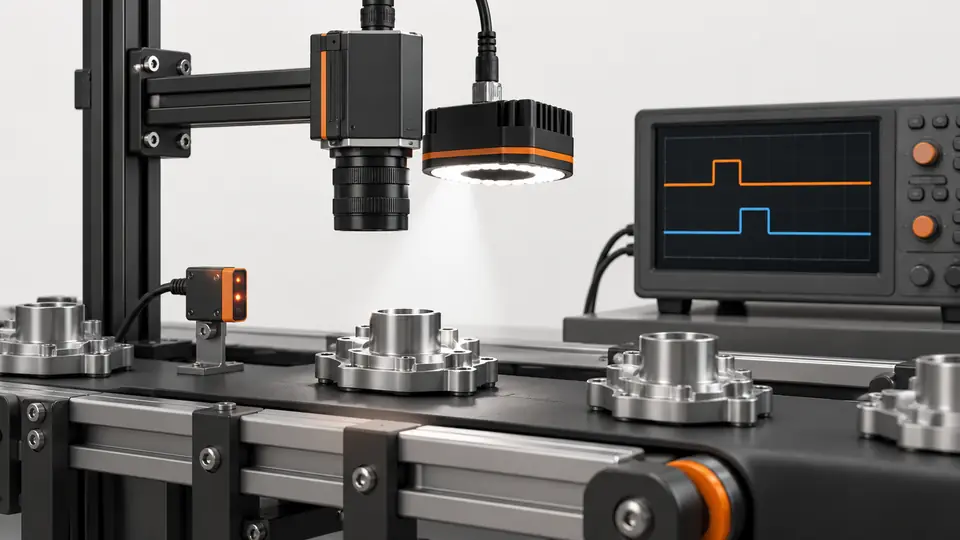
Separate an absent flash, a late flash and a flash that is present but insufficient. These can produce similarly dark inspection images while requiring different corrections. Associate each optical trace with the corresponding captured frame and trigger record. The purpose is to establish when useful illumination reaches the inspected surface, not simply whether the controller received an electrical command.
Operating prerequisites
Confirm shutter mode and the correct all-row flash window for rolling shutters. Observe light-controller current, pulse-width and duty limits; timing outputs have propagation delay.
Confirm which output represents the relevant shutter behavior on the exact camera model. A named exposure signal must not be assumed to represent a common illumination interval for every sensor or ROI. Record polarity, output configuration and relevant timing settings. The proposed comparison is vendor-neutral; selecting or wiring a particular output still requires the model's supported electrical and timing documentation.
Bench and records
Prepare oscilloscope, fast photodiode with suitable electronics and camera output probe. Record controller model, current, pulse width, exposure and probe bandwidth.
Place the photodiode so it observes illumination representative of the part rather than an unrelated direct path from the lamp. Keep its position and electronics unchanged during the sweep. Check that the optical detector is neither clipped nor dominated by ambient light. Record probe connections and bandwidth; an unsuitable measurement chain can make a fast optical edge appear delayed or broad.
Run the test
- Measure camera timing output and photodiode signal on one timebase.
- Locate useful optical rise/fall rather than assuming electrical pulse edges are light edges.
- Sweep delay at low and maximum trigger rates; capture 1000 pulses for jitter and missed flashes.
- Test moving parts and inspect row brightness; repeat at operating temperature and supply variation.
Capture electrical command, camera timing output and optical response on a shared timebase where the instrumentation supports them. Start with a stable baseline and retain the traces from both successful and failed frames. Change the commanded delay without changing unrelated settings. If the optical waveform varies while the electrical command is stable, preserve that observation instead of hiding it with a wider exposure.
Hypothetical worksheet
Hypothetically exposure spans 40–140 µs and light spans 60–110 µs: margins are 20 and 30 µs. A 50 µs pulse at 100 Hz has 0.5% duty. These numbers do not authorize overdriving any light.
exposure_window = [40, 140] us
optical_pulse = [60, 110] us
leading_margin = 60 - 40 = 20 us
trailing_margin = 140 - 110 = 30 us
duty_cycle = 50 us * 100 Hz = 0.5%| Quantity | Hypothetical value | Meaning |
|---|---|---|
| Leading margin | 20 µs | Before useful light starts |
| Trailing margin | 30 µs | After useful light ends |
| Pulse duty cycle | 0.5% | Hypothetical 50 µs at 100 Hz |
The example margins are nominal differences between selected edges, not guaranteed reserves for the installation. Define how useful optical rise and fall are identified and include measurement uncertainty. Compare the largest observed timing excursions with both margins. Duty cycle alone does not establish allowed peak current or thermal behavior; those limits belong to the light and controller documentation.
Test sequence
Test sequence
Place the measured optical pulse within the valid camera window, retaining margin on both sides.
- Window start
- Light rise
- Light fall
- Window end
The timeline diagram should be populated from observed signals using a common reference. Distinguish commanded delay from measured optical delay and preserve their definitions. Record whether the exposure output itself includes a documented offset from sensor activity. Do not adjust the drawing to match an expected pulse position while discarding an optical trace that shows a different result.
Interpret the evidence
Interpret the evidence
Measure actual light, sweep timing and confirm image quality at speed.
- Photodiode
- Delay sweep
- Jitter
- Moving image
The comparison diagram links timing to image evidence. Examine row brightness, motion edges and required defect contrast in frames associated with the traces. For a rolling shutter, a pulse visible on the scope may still illuminate different rows unequally. Confirm the documented usable flash interval instead of treating a clean electrical pulse or a bright central crop as proof of full-frame illumination.
Troubleshooting
- Bright bands on rolling-shutter images suggest a pulse outside the common-row window.
- Stable electrical pulses with drifting light imply controller/LED behavior; use the photodiode evidence.
If failures appear only during rapid trigger bursts, compare the optical response at the failing frames with controller readiness and timing records. If pulse position drifts during warm-up, preserve operating state and repeat the measurement after stabilization. If the photodiode signal changes when its mount moves, restore its reference position before concluding that the lamp has changed. Distinguish instrumentation changes from illumination changes.
Acceptance and handoff
Require the useful light pulse to remain inside the documented window with margin exceeding measured jitter and uncertainties. Also pass motion, uniformity and controller-rating checks; archive optical traces.
Archive the raw files, settings, sample identifiers and decision limits together. Discuss the documented requirements with Deyi Vision using the related product and preparation guides below.
Validate the selected timing with representative moving parts at the required trigger patterns, supply conditions and operating state. Confirm both timing containment and the inspection result; passing either one alone is insufficient. Save scope settings, optical-detector location, configuration and failure traces. State which camera, sensor mode and ROI were tested, and rerun the timing comparison after relevant changes rather than reusing margins from another configuration.
Sources and technical references
These references explain the methods and limits used in this tutorial. Example checks are guidance; production acceptance requires evidence from your own samples.
- Line SourceBasler
ExposureActive and FlashWindow outputs are available only on supported models and have distinct timing purposes.
Checked - Acquisition Timing InformationBasler
Input propagation, debounce, trigger delay and sensor timing contribute to exposure-start delay.
Checked
Component and selection references
- Line Scan Camera Lighting Setup
- Machine Vision Acceptance Test Checklist
- Machine Vision Lighting
- How to Choose Machine Vision Lighting
- Machine Vision Lighting Types
- Machine Vision Lighting Basics
- Reflective Metal Scratch Inspection Lighting Route
- Backlight vs Coaxial Lighting
- Automotive Metal Surface Defect Inspection
- Metal and Surface Inspection
- OPT Lighting Alternative
- Lighting and ROI for a visible liquid boundary
- Calibrate flat-field shading without hiding bad data
- Compare red, blue and white illumination by defect contrast
- OCR labels: light and field geometry
- Choose lighting and ROI for open-package contents
- Run a polarization A/B test for glare
- Seal and bead appearance: lighting and ROI
- SKU color sorting: light and object mask
- Surface defects: acceptance and line output
- Surface defects: bounded AI evaluation
- Surface defects: camera sampling and motion
- Surface defects: light and ROI validation
- Surface defects: false-alarm diagnosis