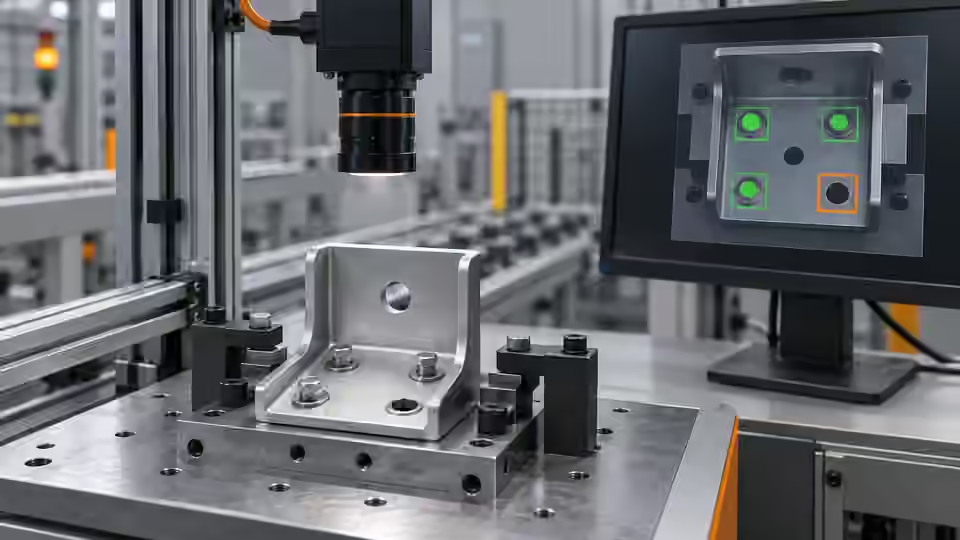
Inspection task
Start with grayscale, a thresholded component mask and a count rule in the assigned feature region. For a stated single-feature example, one eligible component is the intended condition; this does not prove that the component is the correct part. Ask AI to propose one explainable threshold or area-bound change, while keeping feature location and the physical presence definition fixed.
Prerequisites and sample controls
Define presence as a visible feature at a specified location, not merely any dark object in the frame. Prepare a correctly assembled sample, an intentionally missing feature and an obscured feature with recorded human answers. Keep fixture details and permitted part variation in the dataset. The fixed-station baseline distinguishes separated components by image contrast; it is not a general semantic recognizer and must not infer a hidden component.
Choose the camera route
A monochrome area-scan camera is a practical starting point for a fixed, contrasting feature. Use a global-shutter route when motion remains during exposure; a compact smart-camera route needs verified processing and I/O support. A color camera is justified when color is part of the decision. If depth or occlusion determines presence, a flat image alone cannot settle the question.
Run the controlled procedure
Build the smallest observable baseline before asking AI to propose changes. Fix the original image, ROI, expected answer and runtime identity; inspect intermediate outputs, not only the final indicator. The current Deyi Vision workflow approach can compare candidate changes on versioned development data. An AI suggestion is a proposal for review, not an operator-approved tolerance or a validated physical measurement.
- Review the original, mask and eligible component area for each control.
- Save the baseline before considering an AI parameter proposal.
- Apply one candidate to the same development images.
- Have a person check new labels before adding difficult samples.
Process map
The visible mask feeds a component rule. Candidate parameters are compared against the frozen baseline and reviewed by a person.
- Frozen data
- Baseline
- Candidate
- Human review
Record the evidence
Log the actual component count, selected area and review state alongside each image identity. Do not populate missing answers with AI predictions. Compare missing-feature false passes separately from present-feature false rejects; a combined score can hide the more costly failure.
Prepare a development comparison sheet with one row per original image and keep the physical answer fixed before inspecting candidate results. For each row, record the baseline decision, candidate decision and the visible region responsible for each. Classify a change as a recovered missing-feature rejection, a recovered present-feature pass, a new false pass, a new false reject or unresolved visibility. These labels prevent an apparent improvement on easy present samples from concealing a new miss on absent samples. When the candidate changes an area limit, inspect the regions removed and admitted by that specific limit. A parameter change that accepts a fixture region should be rejected even if it improves the combined development score. Keep the rejected candidate and its explanation available for later review.
| Control | Required observation | Decision boundary |
|---|---|---|
| P: feature present | Visible feature in its assigned region | Presence requires valid evidence |
| A: feature missing | Region visible; intended feature absent | Absence is a valid failure |
| O: feature obscured | Feature cannot be observed | Review; never infer presence |
Diagnose failed cases
A fixture screw can satisfy a count of one while the required pin is absent. AI cannot repair that error by renaming the detected region. Return to spatial definition and observability. An obscured feature remains a review case even when the model strongly predicts presence.
Failure isolation
One foreground region may be the feature, a fixture or an occlusion artifact. Its count alone does not establish identity.
- Feature
- Fixture
- Missing
- Review
Validate independently
Compare the unchanged baseline and one candidate on the same development samples. Preserve every failure and inconclusive result in the denominator. Add difficult images to a bounded review set, but keep predicted labels unconfirmed until a person checks them. If a model needs a local service or authorized outbound images, absence of that capability must stop execution rather than trigger an undisclosed backend substitution.
On withheld samples, verify the assigned location and component evidence before evaluating the final rule. Do not lower the physical missing-feature requirement to improve development scores.
Use difficult-sample recovery as a request for evidence, not automatic truth. A new sample should retain its original image, source event and reason for review. A person checks whether the physical feature is present and whether it is actually visible; the model prediction is stored separately. If the new answer is used to tune the next candidate, that image belongs to development and must not be reported as untouched acceptance evidence. Freeze the chosen graph and parameters after the comparison, then give an independent evaluator withheld controls with the same physical definitions. Examine disagreements before any installation decision. Do not allow a workflow editor to approve changed physical tolerances or confer acceptance just by saving a new version. Keep the distinction between a reproducible candidate and an approved station explicit.
Continue the engineering handoff
Save the graph, parameters, dependencies and development comparison. Keep the independent acceptance answers outside AI tuning access. A review export is evidence for inspection; it is not a complete runnable release package or proof of approval. Browser execution, cloud-model quality and executable release activation require their own verified capabilities.
Save the original image and the resulting record together.
Sources and technical references
These references explain the methods and limits used in this tutorial. Example checks are guidance; production acceptance requires evidence from your own samples.
- Visual inspection system design checklistDeyi Vision
Define sample decisions, station constraints and measurable acceptance before hardware selection.
Checked - Structural analysis and shape descriptorsOpenCV
Connected component areas and centroids describe image regions, not hidden physical part counts.
Checked
Component and selection references
- Vision Inspection System
- Industrial 2D Cameras
- How to Calculate Camera Resolution for Inspection
- PCB Connector Pin Presence Inspection
- What Is Machine Vision?
- Machine Vision Systems
- Machine Vision System Components
- How Does a Machine Vision System Work?
- Industrial Barcode Readers
- Component counting: camera setup for separation
- Component counting: lighting and ROI boundaries
- Component counting: merged and split part diagnosis
- Part positioning: acceptance and motion handoff
- Part positioning: an AI-assisted pixel workflow
- Part positioning: camera and coordinate setup
- Part positioning: lighting and ROI stability
- Part positioning: locate the cause of pick offset
- Presence inspection: acceptance and line integration
- Presence inspection: a reliable camera setup
- Presence inspection: lighting and ROI control
- Presence inspection: isolate false-pass causes