Purpose and operating boundary
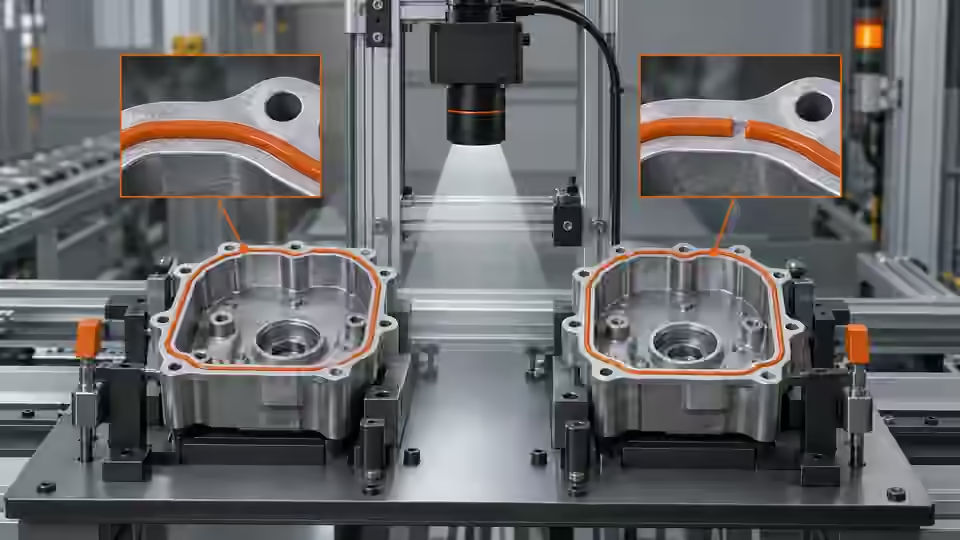
Plan raw-image sampling, focus and motion blur for visible seal edges and bead gaps; appearance alone cannot establish leak or bond performance.
This tutorial defines an engineering evaluation, not a ready-to-run product certification. The current Deyi Vision public PC example covers an EAN-13 workflow on confirmed sample images. Native OCR and detection work in the engineering code must be checked against the installed runtime, bound models and job before use. A browser template does not prove browser execution: the planned OpenCV.js backend needs separate verification. Cloud recognition requires explicit approval of the image scope, provider, model and cost. A review archive is not an executable release package. Camera, firmware and driver compatibility require their own check. All worksheet values below are hypothetical; they are not Deyi Vision measurements or customer results.
Prepare the evidence
Prepare the actual substrate and material state, a visible missing section and an obscured section. Define the inspected plane and smallest declared visual feature. Define the visible acceptance feature before building a seal or bead mask. A tamper-seal edge, a heat-seal band and an adhesive bead have different physical meanings and must not share an undeclared appearance rule. Record the reference path, permitted projection, substrate and state of the material at capture. Wet adhesive, cured material and a reflective backing can produce different boundaries without an equivalent change in joint integrity. Include a deliberately visible gap, an offset path, a plausible reflection and an obscured section as separate controls. The assigned image rule evaluates observable surface appearance only. It cannot establish airtightness, leak rate, peel strength, bond strength, cure or a hidden interface. Those claims need their own process-specific evidence. If the required interface is hidden, return insufficient evidence or choose another validated observation method; do not complete the path from an expected drawing. Begin with an acquisition record rather than a displayed preview. A preview may be resized, sharpened or reused after the input has stopped. Save the unmodified frame, image dimensions, pixel format, exposure, gain, lens setting, working distance, trigger identity and acquisition time. Include the smallest relevant feature and the largest allowed position variation in the same test. First capture a stationary sample to separate focus from motion blur; then repeat at the actual movement conditions without changing the optical geometry. Link every saved image to the physical sample or event. A missing or stale frame is an acquisition failure even when the last visible image looks good. Before reusing the capture configuration, check that the stored pixel format and active region still match the saved recipe. Record any binning, resizing or image conversion because the object scale calculated from source pixels no longer applies unchanged after those operations. Compare the archived frame with the frame passed into the first processing node. If they differ, retain both identities and explain the conversion. During a reconnect trial, distinguish a new exposure from a repeated buffered frame. Disable automatic pass-through while acquisition identity is uncertain, and retain the event that caused the mismatch rather than silently resetting the counter.
Procedure
- Measure field width and native pixels at the reference plane; record changes in projected scale when the part tilts or rises.
- Focus the complete path, including corners and the far side, without treating preview enlargement as new evidence.
- Compare stationary and moving originals at fixed gain and light; calculate the starting exposure and inspect gap preservation.
- Record event identity and the full source frame; hidden portions remain unobservable rather than being filled from a reference drawing.
Interpret the trial
The hypothetical scale is 0.05 mm/px. A 0.8 mm bead projects to 16 px and a 0.3 mm gap to 6 px. At 300 mm/s with 100 µs exposure, blur is 0.6 px. These are planning examples, not demonstrated minimum detection sizes or calibrated width accuracy. Projection and optical blur still require checks on real material.
Recording worksheet
| Record | Value | Interpretation |
|---|---|---|
| Field / width | 100 mm / 2000 px | Scale = 0.05 mm/px |
| Bead / gap | 0.8 mm / 0.3 mm | 16 px / 6 px; projection only |
| Motion | 300 mm/s; 100 µs | Blur = 0.6 px |
s = 100 / 2000 = 0.05 mm/px
bead = 0.8 / 0.05 = 16 px
gap = 0.3 / 0.05 = 6 px
blur = 300 * 0.0001 / 0.05 = 0.6 px
Two engineering views
Two engineering views · 1
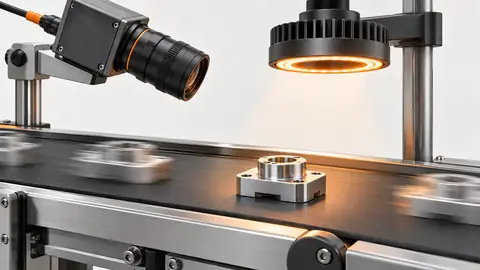
The diagram shows the order of checks. Each arrow requires recorded evidence; it does not imply an implemented automatic connection. Sample → Pixel scale → Motion → Frame identity.
- Sample
- Pixel scale
- Motion
- Frame identity
Two engineering views · 2
The diagram shows the order of checks. Each arrow requires recorded evidence; it does not imply an implemented automatic connection. Stationary → Moving → Raw image → Evidence.
- Stationary
- Moving
- Raw image
- Evidence
Failure diagnosis
- A bead that looks continuous only after enlargement may have an unresolved original gap.
- A clear outer seal edge does not reveal adhesive coverage beneath an opaque overlap.
Acceptance and handover
Accept acquisition when the declared visible features remain inside the frame and observable through permitted pose and movement. Record hidden regions as limits and preserve raw gap controls for the later mask trial.
Keep the source images, the expected decision, the exact revision and the complete result record together. Freeze the evaluation set before selecting the final parameters. If those answers are later used to tune the workflow, mark that set as development data and obtain a new independent acceptance set. Keep Review, NoResult, execution error and missing acquisition visible in the denominator; do not turn them into passes by filtering rows. Save a reproducible failure alongside the successful sample. The handover should identify who may change the recipe, how a prior approved revision is restored and which device output remains inhibited until acceptance. A software result alone does not establish that a moving physical part reached the correct destination.
Sources and technical references
These references explain the methods and limits used in this tutorial. Example checks are guidance; production acceptance requires evidence from your own samples.
- Deyi Vision Vision WorkbenchDeyi Vision
The public PC example is bounded EAN-13 saved-image scope; templates are not universal executable support or production acceptance.
Checked - Calculate exposure limits from conveyor speedDeyi Vision
Object sampling and compatible-unit motion-blur calculation; every new worksheet input here is hypothetical.
Checked - Exposure TimeBasler
Available and effective exposure values depend on camera, sensor and mode; no universal support claim.
Checked - Camera CalibrationOpenCV
Camera calibration and distortion correction have declared geometry; a nominal pixel scale does not validate 3D or functional integrity.
Checked
Component and selection references
- Industrial 2D Cameras
- Pharmaceutical Packaging Code Label Seal Inspection
- Automated Visual Inspection
- Industrial Camera for Machine Vision
- Industrial Camera vs Regular Camera
- GigE vs USB3 Industrial Camera
- PCB Connector Pin Presence Inspection
- Basler Camera Selection
- Allied Vision Camera Selection
- Hikrobot Machine Vision Alternative
- IDS Imaging Camera Selection
- Test gain, bit depth and low-contrast noise
- Diagnose lost GigE packets without masking the fault
- Measure hardware-trigger delay and jitter
- OCR labels: camera and character sampling
- SKU color sorting: acquire repeatable color
- Surface defects: camera sampling and motion
- Validate synchronized cameras under burst traffic