What the test resolves
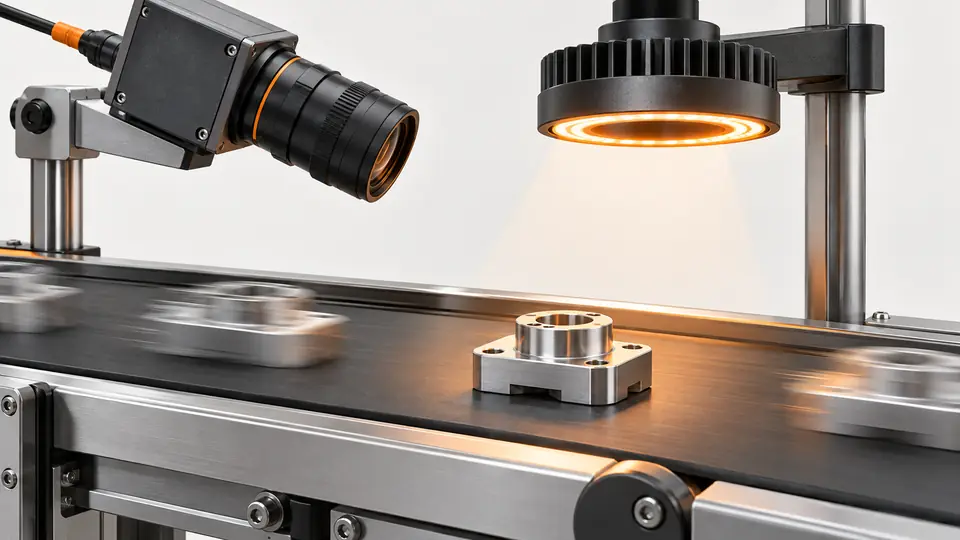
Moving parts can blur even when the frame rate is high. This test converts object speed and image scale into an exposure ceiling, then verifies that ceiling on the actual moving edge.
This is a vendor-neutral commissioning method. Check the exact camera, lens, sensor or controller manual before changing settings. The numerical worksheet is hypothetical, not a Deyi Vision measurement or a product specification.
Operating prerequisites
Use a fixed camera and rigid target moving approximately parallel to the image plane. Measure the highest local speed, not only the conveyor's nominal setting; rotation and vibration need separate checks.
Exclude samples that change height or rotate during this first experiment: their apparent displacement cannot be represented by a single conveyor speed. For a rolling-shutter camera, record the scan direction and test skew independently. Disable automatic exposure and automatic gain so that the exposure under investigation remains the exposure actually used. Define the inspection direction, feature size and allowable image displacement before looking at the trial images.
Bench and records
Prepare a scale target, encoder or independent speed measurement, raw-image capture and a repeatable sharp edge. Fix focus, aperture, gain and lighting; record camera model, shutter type, ROI and effective exposure if available.
Create a record containing sample ID, direction of travel, measured field width, active pixel width, speed measurement method, commanded exposure and any reported effective exposure. Add illumination settings and the raw file name. Position the reference edge close to the real defect location, rather than at a convenient distant corner. Use the same edge orientation in the stationary and moving captures so optical differences do not masquerade as motion.
Run the test
- Measure field width and pixel count at the inspection plane; check scale near the defect location.
- Record the fastest speed and choose an allowable blur in pixels from the smallest feature requirement.
- Compute the ceiling, then acquire 100 moving images at 25, 50 and 100 µs with unchanged geometry.
- Compare moving edge width with a stationary reference and repeat at minimum light output and maximum line speed.
With the conveyor stopped, capture the reference without adjusting focus. Draw a profile perpendicular to the edge and save the profile coordinates and the method used to calculate edge width. Restart motion and repeat that same measurement on every acquired image, retaining the maximum width and its frame ID as well as the distribution. If the edge moves out of the measurement region, correct tracking before comparing the widths.
Hypothetical worksheet
Hypothetical case: a 100 mm field spans 2000 pixels and the part moves at 500 mm/s. Allowing 0.5 pixel displacement gives 50 µs. This bounds motion only; it does not prove defect detection or account for rolling-shutter skew.
s = FOV / pixels
t_max = allowed_blur_pixels * s / speed
Example: 100 / 2000 = 0.05 mm/px
0.5 * 0.05 / 500 = 0.00005 s = 50 us| Quantity | Hypothetical value | Meaning |
|---|---|---|
| Object scale | 0.05 mm/px | 100 mm divided by 2000 pixels |
| Allowed displacement | 0.5 px | Chosen engineering limit |
| Exposure ceiling | 50 µs | Motion-only ceiling at 500 mm/s |
Keep field width and speed in compatible length units and convert microseconds to seconds before multiplying. In this example, the calculated exposure is a ceiling for the selected displacement allowance, not a preferred operating value. A lower exposure may offer margin but must still provide usable signal. Compare the worksheet with the measured moving-edge spread; a disagreement requires checking local scale, actual speed and effective exposure before revising the blur allowance.
Test sequence
Test sequence
Image scale and speed determine displacement during exposure; the validation uses a stationary and a moving reference.
- Scale
- Speed
- Exposure
- Edge check
Interpret the evidence
Interpret the evidence
Compare identical edges at rest and in motion. Added edge spread identifies motion blur without confusing it with the stationary optical blur.
- Stationary
- Moving
- Spread
- Limit
Use the comparison diagram as a measurement plan: the stationary capture establishes the optical baseline and the moving capture adds process motion. Do not subtract edge widths and call the result a universal physical blur estimate; the profile shape and measurement definition influence that difference. Apply one consistent width definition and inspect the saved profiles. A defect inspection run then tests whether the observed spreading changes decisions on the actual parts.
Troubleshooting
- If the stationary edge is already soft, correct focus or optics before shortening exposure.
- If short exposures hide the defect in noise, improve illumination within its ratings; increasing gain alone does not restore missing photons.
If all exposures produce the same apparent spreading, check vibration, tracking and rolling-shutter deformation rather than assuming the shortest exposure failed. If only some frames fail, correlate those frames with speed fluctuations or mechanical events. Check saturation before interpreting a broad edge: clipped highlights can change its profile. Any lighting increase used to recover signal must be followed by another stationary reference, because illumination geometry can change the edge contrast.
Acceptance and handoff
Accept only when the chosen exposure meets the documented moving-edge and defect-detection criteria across the speed range. Retain worst-case images and effective settings; set a speed/exposure interlock if the process can exceed the validated range.
Archive the raw files, settings, sample identifiers and decision limits together. Discuss the documented requirements with Deyi Vision using the related product and preparation guides below.
Freeze the selected settings and run fresh acceptable and defective samples that were not used to choose the exposure. Record detection decisions and moving-edge measurements at the documented speed and illumination extremes. Approval requires both the image-quality limit and the task-specific decision limit to pass; a calculated ceiling alone is insufficient. Include the permitted operating envelope and the action to take when speed, part height, optics or illumination moves outside that envelope.
Sources and technical references
These references explain the methods and limits used in this tutorial. Example checks are guidance; production acceptance requires evidence from your own samples.
- Exposure TimeBasler
Exposure units and limits are model dependent; configured and effective exposure may differ.
Checked - Acquisition Timing InformationBasler
Input propagation, debounce, trigger delay and sensor timing contribute to exposure-start delay.
Checked
Component and selection references
- How to Calculate Camera Resolution for Inspection
- Line Scan Camera with Encoder Setup
- Industrial 2D Cameras
- Industrial Camera for Machine Vision
- Industrial Camera vs Regular Camera
- GigE vs USB3 Industrial Camera
- PCB Connector Pin Presence Inspection
- Basler Camera Selection
- Allied Vision Camera Selection
- Hikrobot Machine Vision Alternative
- IDS Imaging Camera Selection
- Diagnose lost GigE packets without masking the fault
- Measure hardware-trigger delay and jitter
- OCR labels: camera and character sampling
- Seal and bead appearance: camera setup
- SKU color sorting: acquire repeatable color
- Surface defects: camera sampling and motion
- Validate synchronized cameras under burst traffic