What the test resolves
Measure trigger-to-exposure timing independently of image delivery. Host receipt time includes readout, transfer and scheduling and is not the exposure-start time.
This is a vendor-neutral commissioning method. Check the exact camera, lens, sensor or controller manual before changing settings. The numerical worksheet is hypothetical, not a Deyi Vision measurement or a product specification.
Operating prerequisites
The camera must expose a documented timing output or an optically verified alternative. Check I/O voltage, polarity and output propagation delay; a timing output is a proxy, not a perfect sensor timestamp.
Separate trigger acceptance, exposure-start delay and the time when an image reaches software. This experiment observes electrical edges and, where documented, a timing-output proxy for exposure. It cannot directly establish sensor timing unless the manual specifies that relationship. Use a trigger rate the camera can accept, and exclude busy-camera events from a nominal latency distribution only if they are separately counted and reported as failed acquisitions.
Bench and records
Use an oscilloscope with suitable probes, a safe pulse source and camera timing documentation. Save trigger mode, debounce, delay, ROI, exposure and the definition of each measured edge.
Check input voltage, polarity, electrical reference and output loading before connecting an oscilloscope. Select a documented exposure-related output when the model supports it; otherwise report that the proposed electrical proxy is unavailable. Record probe points, cable routing, scope threshold, sample capture settings, trigger activation, debounce and any intentional delay. Save a configuration export so changes to those settings can be matched to changes in the measured distribution.
Run the test
- Configure a supported input edge and timing output using the exact model manual.
- Probe the signal at the camera input and its exposure output; compensate known probe skew.
- Acquire 1000 paired edges at low rate, then repeat at maximum intended trigger rate.
- Calculate mean, minimum, maximum and missing events; repeat after restart and under host load.
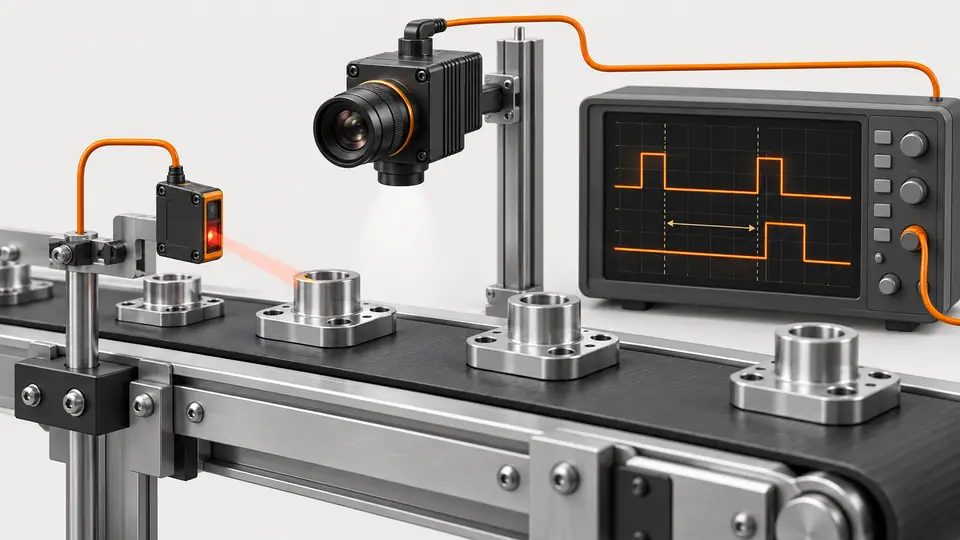
Capture the input and output on the same time base. Mark the chosen active edge on each trace and calculate their difference with the same edge threshold throughout the run. Keep representative traces for the minimum, maximum and unusual values, not only an averaged screenshot. Repeat with the expected controller and wiring after a bench generator test; differences between the two configurations reveal contributions that a camera-only test would miss.
Hypothetical worksheet
Hypothetical output-edge delays of 39–47 µs average 42 µs. Jitter is 8 µs peak to peak. At 500 mm/s the largest delay corresponds to 23.5 µm travel; output propagation must be considered before calling this sensor latency.
L_i = exposure_output_edge_i - trigger_input_edge_i
mean(L) = 42 us; min(L) = 39 us; max(L) = 47 us
peak_to_peak_jitter = 47 - 39 = 8 us| Quantity | Hypothetical value | Meaning |
|---|---|---|
| Mean proxy delay | 42 µs | Hypothetical 1000-event result |
| Peak-to-peak jitter | 8 µs | Maximum minus minimum |
| Travel at maximum delay | 23.5 µm | 500 mm/s × 47 µs |
For the hypothetical distribution, the peak-to-peak value describes observed spread, while the maximum delay estimates travel before the output proxy changes state. Neither is a guaranteed worst-case specification. A constant delay may be compensable in a position model, but compensation does not remove jitter. Record the reference point from which position is calculated and verify any compensation independently using a moving target, keeping the original uncompensated measurements in the report.
Test sequence
Test sequence
Measure input and exposure-output edges on the same clock; image arrival occurs later.
- Input edge
- Exposure proxy
- Readout
- Arrival
Interpret the evidence
Interpret the evidence
Start with supported I/O, then compare paired edges and evaluate delay distribution rather than one trace.
- Verify I/O
- Capture pairs
- Distribution
- Limit
Interpret the timeline in order: controller edge, camera input acceptance, exposure event and observable output. An output propagation delay can shift the measured mean even when sensor timing is unchanged. Compare like-for-like probe locations and output functions. If timing documentation does not quantify an intermediate stage, leave it as an unresolved contribution; do not subtract an assumed value to create an apparently precise sensor latency number.
Troubleshooting
- Extra fixed delay may come from configured trigger delay or debounce.
- Sporadic missing events at high rate can indicate triggering while the camera is not ready; reducing debounce blindly can introduce false triggers.
Missing output pulses require checking trigger-ready or busy behavior before computing latency statistics. A second cluster of delays can indicate a controller sequence, debounce interaction or measurement threshold problem; inspect the corresponding traces. If changing the probe threshold substantially changes measured delay, investigate signal rise time and noise. When testing illumination as well, use a photodiode in a separate synchronized check because the lamp's optical response is not an electrical camera-output edge.
Acceptance and handoff
Set limits for both worst delay and jitter from allowable position error. Require expected event counts and preserve scope traces, output-delay assumptions and settings; report proxy timing explicitly.
Archive the raw files, settings, sample identifiers and decision limits together. Discuss the documented requirements with Deyi Vision using the related product and preparation guides below.
Accept against limits defined for the observed quantity: trigger-to-output delay, acquisition success and position error have separate criteria. Run fresh paired captures with production wiring, controller logic and the highest intended acquisition demand. Document unaccepted triggers and gaps alongside the timing distribution. The handoff must name the measured output, explain its relationship to exposure and state the conditions under which any positional compensation is valid.
Sources and technical references
These references explain the methods and limits used in this tutorial. Example checks are guidance; production acceptance requires evidence from your own samples.
- Triggered Image AcquisitionBasler
Hardware trigger source, activation and selected acquisition event require model-specific configuration.
Checked - Acquisition Timing InformationBasler
Input propagation, debounce, trigger delay and sensor timing contribute to exposure-start delay.
Checked - Line SourceBasler
ExposureActive and FlashWindow outputs are available only on supported models and have distinct timing purposes.
Checked
Component and selection references
- Industrial 2D Cameras
- Industrial Camera Interface Guide
- Machine Vision Acceptance Test Checklist
- Industrial Camera for Machine Vision
- Industrial Camera vs Regular Camera
- GigE vs USB3 Industrial Camera
- PCB Connector Pin Presence Inspection
- Basler Camera Selection
- Allied Vision Camera Selection
- Hikrobot Machine Vision Alternative
- IDS Imaging Camera Selection
- Test gain, bit depth and low-contrast noise
- Diagnose lost GigE packets without masking the fault
- OCR labels: camera and character sampling
- Seal and bead appearance: camera setup
- SKU color sorting: acquire repeatable color
- Surface defects: camera sampling and motion
- Validate synchronized cameras under burst traffic