Observable scope
A bottle that appears underfilled can instead be tilted, imaged during sloshing, or partly hidden by a label. Start by defining what the camera can observe: a visible liquid boundary or a reproducible coverage proxy in a fixed observation zone. That observation is not a volume measurement. A tapered bottle, foam, an opaque wall or a changing meniscus can break the connection between image height and contents. Write the agreed visible feature and the excluded cases into the inspection brief. If that feature cannot be seen reliably, change the viewing arrangement or use another measurement principle before tuning a decision threshold.
Freeze the sample groups
Prepare empty, visibly low, nominal and visibly high containers with the same container design. Include normal variations in wall tint, label placement, molding seams and cap position. Establish the reference class with an independent process check suited to the product, rather than the current vision result. Keep bottle identity and capture batch together when separating development and acceptance material; adjacent frames of the same bottle are not independent evidence. A static bench photograph and a bottle approaching the production trigger are separate sample groups. Preserve both, because a good static view does not demonstrate that the moving station sees the same boundary.
Choose the viewing geometry
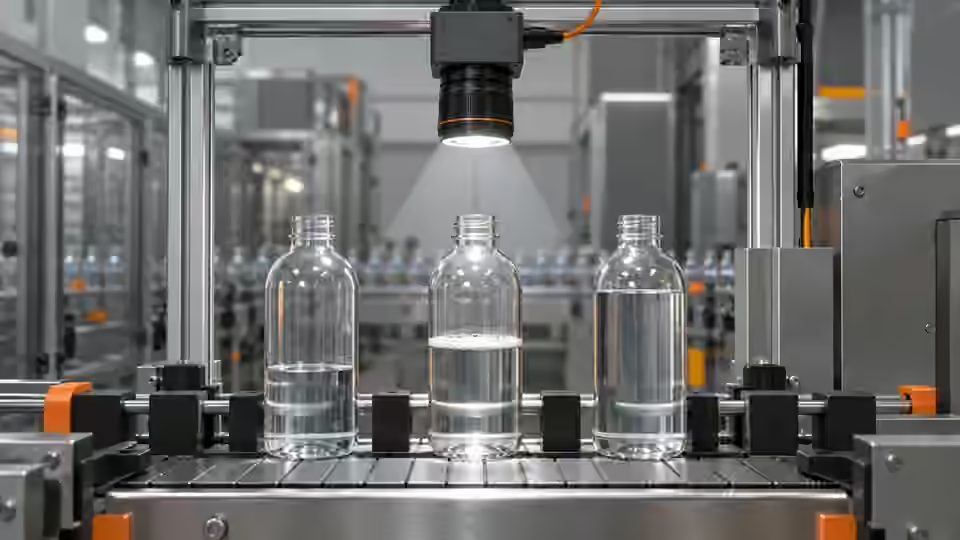
Choose a side view that includes the complete agreed observation zone and a stable container reference. Keep camera height, viewing angle, working distance and container support fixed. A rim, seam or fixture feature may locate the zone, but do not use a deformable label as the sole geometric datum. Move a reference bottle through the permitted lateral and angular play and inspect whether the complete boundary remains visible without being clipped by the crop. Focus on the liquid-boundary plane and inspect the bottle wall as well: curved transparent walls can introduce apparent edge displacement. Record that dependency instead of presenting the nominal pixel scale as a calibrated physical gauge.
Side-view capture geometry
An illustrative observation zone stays tied to a stable container datum while the liquid boundary remains fully in view.
- Fixed camera and working distance
- Container datum and supported pose
- Complete observation zone
- Visible liquid boundary, not volume
Control exposure and motion
Estimate exposure from the motion that actually crosses the image. In an assumed planning example, a 120 mm field of view across 2000 px gives a nominal scale of 0.06 mm/px. At 500 mm/s, a 100 µs exposure produces 0.05 mm of travel, or about 0.83 px. These inputs illustrate the calculation; they are not a validated camera specification or acceptance tolerance. Use the arithmetic below to select a starting exposure, then inspect real boundary sharpness at the fastest allowed transport condition. Liquid motion can differ from container motion, so a sharp bottle edge alone does not prove a stable liquid boundary.
scale_mm_per_px = 120 / 2000
blur_mm = 500 * (100 / 1000000)
blur_px = blur_mm / scale_mm_per_px
# nominal planning result: 0.833333... px; not a measurement calibration
Synchronize the capture
Trigger from a repeatable container event and record which exposure belongs to which bottle. Verify the camera's configured trigger mode, readiness behavior and actual image timestamps against its documentation. A photoelectric sensor may respond to a label edge before the bottle reaches the intended view; test that offset explicitly. Capture after the defined settling condition where the process permits it, without assuming that a longer delay always helps. Check acquisition under the expected sequence of bottles and under an interrupted flow. Missing frames, duplicated images and a stale image paired with a new bottle must remain identifiable failures, never valid level decisions.
Check radiometric stability
Fix exposure, gain and white-balance behavior during the comparison unless automatic control is part of the proposed production configuration. If it is, record its response to empty and filled bottles rather than assuming it leaves the boundary contrast unchanged. Save unmodified source images, pixel format and camera settings; display brightness is not acquisition evidence. Inspect highlights on the wall, the dark-to-bright transition at the boundary and the visible area below it. Saturation can erase a transition even when the preview looks clear. Keep lighting warm-up and ambient-light conditions in the worksheet so apparent camera drift is not confused with a changing illumination state.
Build the acquisition workbook
Build an acquisition workbook with a row for each bottle event, including container identity, reference class, trigger timestamp, image identity, exposure, gain, pixel format, pose and an observability note. Attach a crop only as a derived view; retain the full source image and the crop coordinates. Record whether foam, wall glare, a label or sloshing obscured the agreed boundary. Use the table as a recording structure, not as a set of universal limits. The workbook should let another engineer reproduce a problematic image from the same configuration and distinguish a missing observation from a confirmed low-level sample without reconstructing events from filenames.
| Control | Evidence to save | Interpretation |
|---|---|---|
| Container and pose | Bottle identity, orientation and reference class | Pose-dependent changes require a separate geometry check |
| Motion and exposure | Transport condition, exposure and source image | Sharp wall edges do not prove a stable liquid boundary |
| Trigger association | Event and image identities with timestamps | Missing or stale images are acquisition failures |
| Observability | Label, foam, glare and cropped boundary notes | Unobservable is distinct from confirmed underfill |
Recognize failure signatures
Interpret failure signatures before replacing the camera. A boundary that moves with bottle rotation may come from wall geometry or a molding seam. A boundary that changes only after transport starts may indicate liquid motion or capture timing. A fixed horizontal highlight that survives an empty-bottle test is evidence against treating that line as the liquid surface. When the source image is clipped or the observation zone leaves the view, changing an algorithm threshold cannot recover the missing information. Compare the full frame, the trigger record and the reference bottle together. Record competing explanations and the control that distinguishes them instead of diagnosing a root cause from appearance alone.
Separate observation from acquisition failure
Use the bottle event and original image to establish whether the agreed boundary is actually observable before assigning a level class.
- Match bottle event to source image
- Check complete observation zone
- Record whether boundary is visible
- Proceed to level check or retain failure
Accept the image baseline
Accept the acquisition baseline only after the agreed visible feature is reproducible across the permitted container poses and operating conditions, with independent reference classes and preserved failure cases. Keep unobservable samples separate from low-level defects; a hidden boundary is not proof that the container is underfilled. Freeze the camera configuration, geometry and sample groups before proceeding to lighting and ROI trials. Deyi Vision can review supported saved-image workflows and the proposed station, but source-level workflow support does not establish that a particular runtime, camera connection or production line has passed acceptance. This tutorial specifies an engineering check, not a completed physical test or a volume guarantee.
Sources and technical references
These references explain the methods and limits used in this tutorial. Example checks are guidance; production acceptance requires evidence from your own samples.
- Exposure TimeBasler
Exposure controls and camera-dependent limits; the blur worksheet is an explicitly assumed engineering example.
Checked - Triggered Image AcquisitionBasler
Frame-trigger readiness and acquisition configuration must be checked for the selected camera.
Checked - Camera CalibrationOpenCV
Intrinsic calibration and distortion correction do not turn an uncalibrated visible level into physical volume.
Checked - Deyi Vision Vision WorkbenchDeyi Vision
Saved-image workflow review and project-specific camera integration are distinct evaluation steps.
Checked
Component and selection references
- machine vision software
- Machine Vision Acceptance Test Checklist
- Automated Visual Inspection
- Industrial 2D Cameras
- Battery Tab Weld Height Inspection
- Balluff Vision Sensor Alternative
- Datalogic Barcode Reader Alternative
- Banner Vision Sensor Alternative
- Troubleshoot visible assembly verification failures
- EAN-13 traceability: duplicates and missing reads
- Lighting and ROI for a visible liquid boundary
- Troubleshoot unstable visible fill-level decisions
- Set inspection thresholds with a confusion matrix
- Check laser-profile datum and missing-data behavior
- OCR labels: unreadable versus wrong text
- Set up a camera for open-package completeness checks
- Choose lighting and ROI for open-package contents
- Troubleshoot false package-completeness decisions
- Seal and bead appearance: gap diagnosis
- SKU color sorting: channel and drift diagnosis
- Surface defects: false-alarm diagnosis