Classify the false-complete symptom
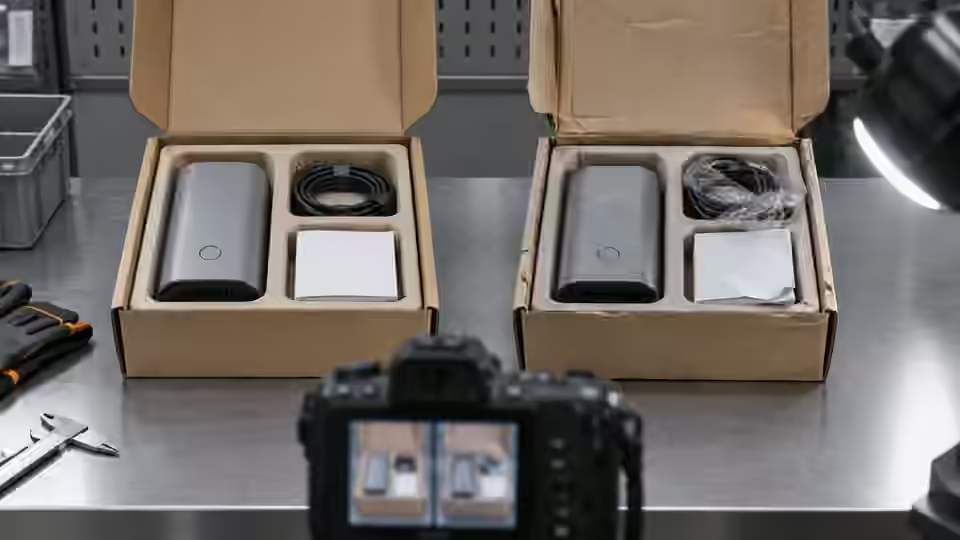
Classify the symptom before changing a threshold: a missing visible item reported complete, a present visible item reported missing, an ambiguous observation routed to review, an execution failure or a decision applied to the wrong package. Preserve the original reference contents and full image. These failures need different explanations and must remain distinguishable. A review result is not a confirmed omission, and a valid-looking count from an empty image is not proof that the kit is complete. Begin with a reproducible failed case and the declared visible-content scope, not with an altered expected quantity selected to make the normal preview pass.
Replay the exact image and kit revision
Replay the exact original image, crop transform, foreground or model revision, BOM identifier and reference contents associated with the symptom. Check actual installed execution identity, not only the workflow name on screen. If identical frozen material produces different evidence, inspect automatic preprocessing, unpinned dependencies or request association before changing packaging optics. If replay is stable but new frames differ, compare acquisition and presentation conditions next. Keep the complete source frame alongside local previews. Successful replay narrows the investigation; it does not establish that the frame belongs to the intended packing event or that the selected kit revision was the correct production recipe.
Separate hidden contents from observed absence
Inspect whether a flap, wrapper, neighboring item or tray wall hides the required object in the failed frame. Compare the same identified package under the permitted baseline and controlled presentation alternative without changing the reference contents. If the item becomes visible only after an unapproved manual removal of normal packaging, the image task remains outside the original station scope. A hidden object cannot be declared absent merely because its zone is dark. Conversely, a reflection in an empty cavity cannot establish presence. Preserve the actual visibility limit and the control that distinguishes it from a real omission before adjusting the completeness rule.
Separate hidden item from empty visible zone
A covered item and an observable empty zone require different evidence dispositions.
- Complete original package view
- Declared visible item zone
- Flap or wrapper occlusion boundary
- Valid visible empty-zone control
Inspect components and filtering effects
Inspect raw foreground components or detector candidates beside the original image. Determine whether contact merged visible items, a shadow split a legitimate component, a tray edge entered the mask or duplicate detections inflated the count. Keep the original label mapping and processing revision. Opening, closing, size filtering and duplicate suppression can repair a representation while also removing a small genuine item or concealing an extra object. Compare any proposed change on the same complete, omitted and extra references. Do not choose the candidate or filter setting that produces the desired count without preserving which physical visible evidence actually remains represented.
failure_record = {
    'package_id': package_id,
    'kit_revision': kit_revision,
    'source_image_id': source_image_id,
    'graph_revision': graph_revision,
    'raw_item_evidence': raw_item_evidence,
    'visibility_state': visibility_state,
    'raw_bom_rule': raw_bom_rule,
    'execution_status': execution_status,
    'event_id': event_id,
}
# Preserve original failure and Review reasons; no implicit Pass or default empty inventory.
Check labels against the BOM contract
Check the exact configured labels, case-sensitive meaning, known-label list and expected quantities against the frozen kit definition. A fixed-zone label does not prove that the foreground is the correct item type; an unfamiliar substitute can satisfy the geometric observation unless separately validated recognition distinguishes it. In the reviewed BOM route, unknown classes need Review, and known labels omitted from expected entries are compared against zero. Preserve those branches rather than renaming inconvenient detections to a familiar label. If a BOM revision changed, evaluate the original failure under its original contract before comparing a new recipe so a specification change is not misreported as an algorithm correction.
Trace package event and recipe identity
Trace package identity, packing operation, source image, graph revision, kit revision, raw decision and receiving acknowledgement separately. A previous complete package can remain in a cache while the current package has no fresh valid image. Simulate late, missing and cancelled results in an isolated environment and preserve their declared nonpassing states. Check whether recipe selection changes between capture and rule evaluation. A correct count evaluated against another kit is not a correct completeness result. Keep execution errors and Review reasons visible, and do not infer that an offline workflow replay has demonstrated physical conveyor timing or controller action.
Keep the packaging diagnostic workbook
Use a workbook row for each original failure with package and event identities, independent reference contents, full image, crop coordinates, acquisition settings, graph and runtime identities, raw item evidence, visibility, BOM contract and suspected mechanism. Add the discriminating control and the observation that would refute the explanation. Preserve baseline and candidate outputs together, including unresolved cases. The table separates visibility, representation, specification and event controls without supplying a universal threshold. Keep review and execution failures within the planned denominator. Another engineer should be able to distinguish a supported correction from an apparent improvement achieved by excluding covered packages or quietly changing the kit list.
| Failure signature | Discriminating control | Evidence retained |
|---|---|---|
| Hidden item reported missing | Same package with allowed presentation change | Full image and visibility boundary |
| Count changes after mask processing | Same original and references before and after | Raw components and processing revision |
| Wrong contents still match expected labels | Check zone identity limits and frozen BOM | Item reference, label mapping and kit revision |
| Current package shows previous complete result | Inject late or missing response in isolation | Package, image, recipe and event identities |
Verify correction on independent packages
Verify the proposed correction on frozen development groups and later on independent packages with acceptance limits agreed beforehand. Confirm that genuine omissions and extra visible objects remain distinguishable, and that a former failure has not simply become an unreported review or an old passing frame. Freeze the corrected optics, graph, BOM and event mapping with the original baseline retained. If the required contents remain hidden or their identity is unproven, keep that boundary and use another observation or inventory control. Deyi Vision can support supported workflow diagnosis, but this procedure does not certify the current runtime package, real camera or a production completeness accuracy.
Correct the evidence layer that actually failed
Preserve the original recipe and failure before testing a discriminating correction.
- Freeze failure image and kit contract
- State optical, representation or event causes
- Run the matched diagnostic control
- Verify correction or retain unresolved limit
Sources and technical references
These references explain the methods and limits used in this tutorial. Example checks are guidance; production acceptance requires evidence from your own samples.
- Image ThresholdingOpenCV
Mask selection and polarity should be examined on the original failed material, not only a preferred preview.
Checked - Morphological TransformationsOpenCV
Morphological processing can merge or remove visible component evidence.
Checked - Deyi Vision Vision WorkbenchDeyi Vision
Versioned image comparison needs original inputs, settings and failure outcomes preserved.
Checked
Component and selection references
- machine vision software
- Machine Vision Acceptance Test Checklist
- Automated Visual Inspection
- Machine Vision Systems
- Battery Tab Weld Height Inspection
- Balluff Vision Sensor Alternative
- Datalogic Barcode Reader Alternative
- Banner Vision Sensor Alternative
- Troubleshoot visible assembly verification failures
- EAN-13 traceability: duplicates and missing reads
- Camera setup for visible fill-level inspection
- Lighting and ROI for a visible liquid boundary
- Troubleshoot unstable visible fill-level decisions
- Set inspection thresholds with a confusion matrix
- Check laser-profile datum and missing-data behavior
- OCR labels: unreadable versus wrong text
- Set up a camera for open-package completeness checks
- Choose lighting and ROI for open-package contents
- Seal and bead appearance: gap diagnosis
- SKU color sorting: channel and drift diagnosis
- Surface defects: false-alarm diagnosis