Classify the failure before tuning
An unstable level decision can originate before image processing, within boundary selection or after the result leaves the workflow. Classify the failure with its original image and event record before changing a threshold. Distinguish a visible boundary assigned the wrong level class, an unobservable boundary routed to review, an execution failure and a result associated with the wrong bottle. They require different corrections and must remain separate in the report. A review outcome is not a confirmed underfill, and a low numeric default is not proof that the bottle is empty. Preserve the production symptom and a reproducible development case without relabelling either to fit the current algorithm.
Replay exactly the same material
Replay the same frozen source image, crop transform, workflow revision and reference class to ask whether the processing result itself is repeatable. Record actual input preparation and runtime identity, not only the workflow name visible in the interface. If identical material produces different outputs, inspect automatic preprocessing, unpinned dependencies or request-result association before blaming transport. If saved-image replay is stable while new frames vary, compare acquisition and material conditions instead. Do not replace a difficult frame with a convenient neighboring image. The replay narrows the investigation to an evidence layer; it does not prove that the source image represents the correct bottle event.
Challenge the bottle-wall explanation
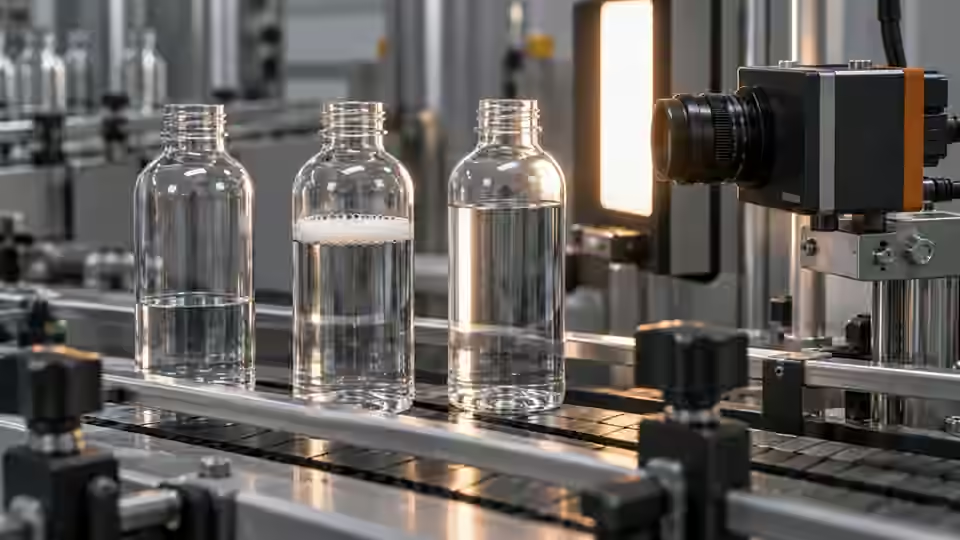
Rotate an identified empty control bottle through the permitted pose range while retaining the capture configuration. A line that remains without liquid can be a wall reflection, a molding seam or a background feature. Compare it with the intended boundary on the same container design. Change only the illumination angle for the next controlled pair and retain both source frames, including saturated areas. If the competing line tracks the wall rather than the liquid, a contrast threshold alone may select the wrong surface more consistently. Test the proposed optical correction against real low-level examples and normal wall variation; do not accept it only because the preview is cleaner.
Distinguish wall line from liquid boundary
Compare the same container geometry and empty control before assigning a transition to the liquid surface.
- Original full bottle view
- Declared observation zone
- Competing wall or reflection line
- Intended visible liquid boundary
Separate timing from liquid motion
Separate container motion from liquid motion using the station's agreed settled and moving sample groups. Inspect trigger timestamps, actual exposure, transport condition and the image region in which the liquid boundary appears. A sharp external bottle edge with a changing internal surface suggests a different investigation from general image blur, but it does not identify a cause by itself. Compare the same bottle at the baseline capture event and the proposed event without changing its reference class. A delayed image must still refer to the intended bottle. Check interruption and restart sequences as well, because an apparently helpful settling delay can break event association when bottle spacing changes.
import math
state = result['rules']['Decision']
raw_number = result['number']
measurement_valid = (
    state in ('Pass', 'Fail')
    and result['geometry']['Validity'] == 'Valid'
    and type(raw_number) in (int, float)
    and math.isfinite(raw_number)
)
record = {
    'image_id': source_image_id,
    'workflow_revision': frozen_revision,
    'raw_state': state,
    'raw_number': raw_number,
    'trusted_ratio': raw_number if measurement_valid else None,
}
# Diagnostic record only; missing fields raise errors. Validate event identities before integration.
Check ROI and coordinate changes
Check whether a camera move, crop revision, image resize or changed container datum altered the coordinate basis. A visible-height ratio from a local ROI cannot be compared directly with a ratio from a different-height or shifted ROI. Overlay the declared zone on the full original image and confirm that the complete intended boundary remains inside it over permitted poses. Keep the crop origin and dimensions in the diagnostic record. If the boundary is clipped, recover the observation through geometry or capture, not by loosening a decision interval. Calibration does not supply missing pixels and a nominal scale does not establish physical volume through a curved bottle wall.
Inspect validity and stale results
Inspect numeric, geometry and rule outputs together with their request and image identities. The reviewed visible-level route marks ambiguous or insufficient boundary evidence as Review; a default numeric port must not be treated as a valid measurement. Check whether an interface, cache or downstream mapping retained a ratio from the previous bottle while showing the current event. Simulate a missing or late result in the test environment and verify that it stays explicitly nonpassing. The diagnostic record below illustrates fields to retain, not a complete integration implementation. Unknown states and execution errors need their declared handling rather than automatic conversion into a convenient level class. A trusted ratio requires Pass or Fail, Valid geometry and a finite numeric value; every other state carries no trusted measurement.
Keep a diagnostic workbook
Use a workbook row for each investigated failure, including its reference class, full image identity, event identity, crop transform, workflow revision, actual settings, typed output and suspected mechanism. Add the discriminating control and the observation that would refute the explanation. Keep original failed outputs beside the candidate results, including cases that remained unresolved. The table separates optical, timing, coordinate and result-mapping controls without assigning a universal threshold. Report review and execution failures within the original planned denominator. A successful replay of selected images cannot replace evidence for the containers and operating conditions that caused the actual line symptom.
| Failure signature | Discriminating control | Evidence to retain |
|---|---|---|
| Line persists in an empty bottle | Same design and pose with unchanged camera | Full image and competing-boundary annotation |
| Variation begins during transport | Same bottle, declared settled and moving events | Event timestamps, exposure and source frames |
| Ratio changes after crop revision | Overlay both ROIs on the same source image | Crop transforms and original coordinate basis |
| Current event shows a previous result | Inject missing or late result in a test environment | Request, image and result identities with nonpassing state |
Verify the correction on the frozen groups
Verify a correction on the frozen development groups before selecting it, and then use independent acceptance material with limits agreed beforehand. Confirm that the corrected case improves without concealing low-level defects, increasing unreported review or reusing an old image. Freeze the changed configuration and retain the baseline so a receiving engineer can reproduce both. If the agreed boundary remains unobservable, preserve that limit and consider another viewpoint or measurement principle. Deyi Vision can help examine supported workflow evidence, but this diagnostic procedure does not certify a released runtime or production station. A visible-level repair must not be presented as validation of fill volume.
A reproducible root-cause check
Preserve the failed result and use a controlled comparison rather than a convenient passing frame.
- Freeze failure material and reference
- State competing explanations
- Run the discriminating control
- Verify correction or retain unresolved limit
Sources and technical references
These references explain the methods and limits used in this tutorial. Example checks are guidance; production acceptance requires evidence from your own samples.
- Exposure TimeBasler
Camera-dependent exposure configuration is a separate variable from transport and liquid motion.
Checked - Triggered Image AcquisitionBasler
Readiness and frame association need a camera-specific acquisition check.
Checked - Deyi Vision Vision WorkbenchDeyi Vision
Versioned saved-image comparisons must preserve the sample, settings and failure evidence.
Checked
Component and selection references
- machine vision software
- Machine Vision Acceptance Test Checklist
- Automated Visual Inspection
- Machine Vision Systems
- Battery Tab Weld Height Inspection
- Balluff Vision Sensor Alternative
- Datalogic Barcode Reader Alternative
- Banner Vision Sensor Alternative
- Troubleshoot visible assembly verification failures
- EAN-13 traceability: duplicates and missing reads
- Camera setup for visible fill-level inspection
- Lighting and ROI for a visible liquid boundary
- Set inspection thresholds with a confusion matrix
- Check laser-profile datum and missing-data behavior
- OCR labels: unreadable versus wrong text
- Set up a camera for open-package completeness checks
- Choose lighting and ROI for open-package contents
- Troubleshoot false package-completeness decisions
- Seal and bead appearance: gap diagnosis
- SKU color sorting: channel and drift diagnosis
- Surface defects: false-alarm diagnosis