Bound the workflow claim
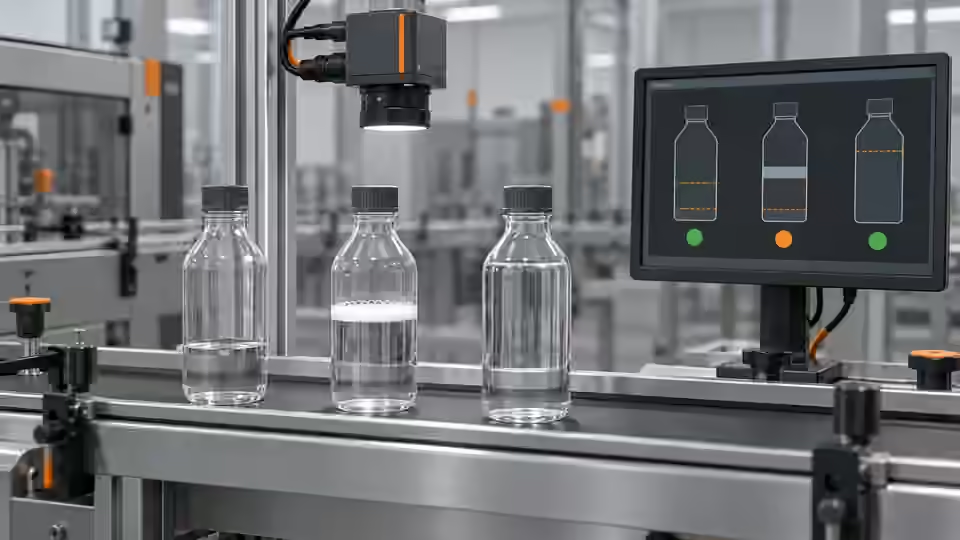
The AI-workflow stage does not require a neural model to estimate the contents of a bottle. A source-reviewed fixed-station route can derive a visible-height ratio from an observable boundary, while an AI assistant helps inspect the graph and propose a controlled parameter change. Keep those roles separate. The calculated ratio is not liquid volume, and an assistant's explanation is not an independent measurement. Deyi Vision supports source-level workflow review within declared boundaries; the actual installed nodes and runtime still require project verification. Browser-local OpenCV.js execution is not an implemented capability in the reviewed source snapshot and must not be implied by a web preview.
Declare the input contract
Freeze the original image identity, pixel format, container group, crop coordinates and reference class before evaluating the graph. A crop must carry the transform back to the original image so a reported boundary can be located in the bottle view. Reject malformed dimensions, an out-of-bounds crop and mismatched image identities instead of silently resizing or substituting a demonstration image. Keep acquisition failures outside the category of physical underfill. If an accepted input format needs a grayscale conversion, declare that conversion in the workflow revision and preserve the original material. Comparing a revised crop to a different source image does not isolate a parameter change.
Check boundary observability
The reference route looks for a sufficiently contrasted, unique vertical intensity transition across enough of the observation zone, with a bounded spread of boundary positions. Its settings control observability as well as the allowed visible-height ratio. In an explicitly synthetic example, a 20 px zone with a unique boundary at y=8 produces 0.6; a boundary at y=14 produces 0.3. Equally strong competing transitions remain Review rather than an arbitrary choice of the first edge. Do not transfer synthetic contrast or spread settings directly to a customer's container. Confirm the observation feature against real labelled examples, including empty bottles, wall glare and foam.
Keep image and proxy coordinates linked
The boundary geometry refers to a fixed crop and original container image rather than an unlabeled ratio.
- Frozen original image identity
- Declared crop and transform
- Observable boundary geometry
- Ratio with its validity and rule
Gate the typed outputs
Consume the numeric, geometry and rule outputs as a related result, not as independent interchangeable values. In the reviewed reference implementation, an unobservable boundary can leave the numeric port at a default value while the rule is Review and the geometry is invalid for measurement. That default is not a measured empty bottle. Gate interpretation on the declared validity and decision state, and preserve the image and workflow identities that produced it. The pseudocode below illustrates the control boundary rather than a ready PLC connector. Missing rules, nonfinite values, wrong output types or an unrecognized state are failures requiring explicit handling, never a reason to manufacture a passing ratio.
import math
state = result['rules']['Decision']
raw_number = result['number']
measurement_valid = (
    state in ('Pass', 'Fail')
    and result['geometry']['Validity'] == 'Valid'
    and type(raw_number) in (int, float)
    and math.isfinite(raw_number)
)
trusted_ratio = raw_number if measurement_valid else None
decision = state
# Preserve the native decision and identities; this snippet does not drive an actuator.
# Missing fields raise errors; invalid geometry or values never become a trusted level.
Constrain the AI proposal
Ask the assistant to propose a candidate with a stated hypothesis, such as separating a wall reflection from a genuine boundary by changing an allowed contrast setting. Limit the change to supported declared parameters and retain the baseline graph. Require the proposal to name the affected sample groups and the counterexample that would disprove the hypothesis. It must not alter reference answers, crop the troublesome samples away, remove Review outcomes or switch an unverified backend to obtain a better score. A saved candidate records an engineering suggestion. It does not confirm that an experiment ran, a model is ready or a production camera configuration has changed.
Compare on development material
Evaluate the baseline and candidate on the same frozen development material, using identical input preparation and the complete planned denominator. Compare observable pass and fail decisions separately from Review, execution errors and missing results. Include per-container groups rather than counting many adjacent frames as independent successes. Inspect whether an apparent reduction in underfill misses comes from sending more low-level bottles to Review. That tradeoff may be useful but must remain explicit. After selecting a candidate, keep acceptance material independent; if its answers are used for another parameter change, describe it as reused development evidence rather than an untouched acceptance set.
Keep a workflow workbook
The workflow workbook joins input image identity, crop transform, container reference class, baseline and candidate revisions, actual runtime identity, parameter values and typed outputs. Save the original rule state and geometry together with the numeric port, including failures. The table shows why a single numeric column cannot describe the experiment. Record elapsed time as an observation from the actual execution, not a promise based on a saved graph. Separate graph authoring, successful execution and engineering approval in the record. This structure allows another reviewer to reconstruct whether the candidate changed boundary observability, the allowed ratio interval or only the explanation attached to an unchanged result.
| Result situation | Required record | Interpretation |
|---|---|---|
| Unique boundary in synthetic 20 px ROI at y=8 | Ratio 0.6 plus matching geometry and rules | Observable proxy; apply the declared ratio rule |
| Synthetic unique boundary y=14 | Ratio 0.3 plus matching geometry and rules | Observable lower proxy; retain its declared decision |
| Equally strong boundaries | Review state and invalid measurement geometry | Do not interpret a default numeric port as empty |
| Runtime or identity mismatch | Original execution failure and request identity | No trusted level result; no previous-image substitution |
Inject missing and ambiguous evidence
Inject explicit failure cases before preparing a handoff: missing source image, wrong crop identity, unavailable runtime, equally strong boundaries and a result that arrives after the request has been cancelled. Check that each keeps a visible nonpassing state and cannot borrow an old ratio from a previous bottle. A retry must remain tied to its own request and result identity; an uncertain response is not evidence of success. If the workflow uses a detector or external model in a project-specific extension, verify the exact package and input-output contract separately. A listed template or imported model does not establish readiness, and this tutorial does not authorize image transmission.
AI proposes; a recorded comparison selects
Keep candidate authoring distinct from execution, comparison and project acceptance.
- Freeze material and baseline revision
- Propose a bounded parameter hypothesis
- Compare complete typed results
- Select candidate and preserve limits
Hand off a candidate, not a release
Hand off the selected candidate with its frozen material, declared input contract, observability settings, typed-output mapping and complete comparison report. Preserve the baseline and unresolved examples so a receiving engineer can reproduce both behavior and limits. Integration still needs verified camera acquisition, event association, latency handling and independent line acceptance. Do not publish an accuracy figure from the synthetic worksheet or present source-level fixed-station support as a released application passing a real plant test. The next troubleshooting stage should start from retained failure evidence, not from a graph marked successful because it saved without an error.
Sources and technical references
These references explain the methods and limits used in this tutorial. Example checks are guidance; production acceptance requires evidence from your own samples.
- Image ThresholdingOpenCV
Declared image polarity and controlled preprocessing are separate from physical interpretation.
Checked - Deyi Vision Vision WorkbenchDeyi Vision
Versioned supported workflows and MCP-assisted engineering review; a saved-image result is distinct from camera integration and production acceptance.
Checked
Component and selection references
- machine vision software
- Machine Vision Acceptance Test Checklist
- Automated Visual Inspection
- EAN-13 traceability: line acceptance
- EAN-13 traceability: decode and data rules
- Stable camera acquisition: buffers, timeouts and reconnection
- Accept and integrate a visible fill-level workflow
- Link inspection records, images and part identifiers
- OCR labels: acceptance and PLC contract
- OCR labels: native workflow and exact match
- Accept and integrate open-package completeness checks
- Build an AI-assisted open-package completeness workflow
- Build a PLC–vision handshake with explicit states
- Seal and bead appearance: line acceptance
- Seal and bead appearance: workflow rules
- SKU color sorting: acceptance and unknown route
- SKU color sorting: typed color and SKU rules
- Surface defects: acceptance and line output
- Surface defects: bounded AI evaluation
- Load-test latency from trigger to PLC decision
- Version and roll back the complete vision recipe